Your Complete Toolkit for Search Engine Optimization
INTRODUCTION
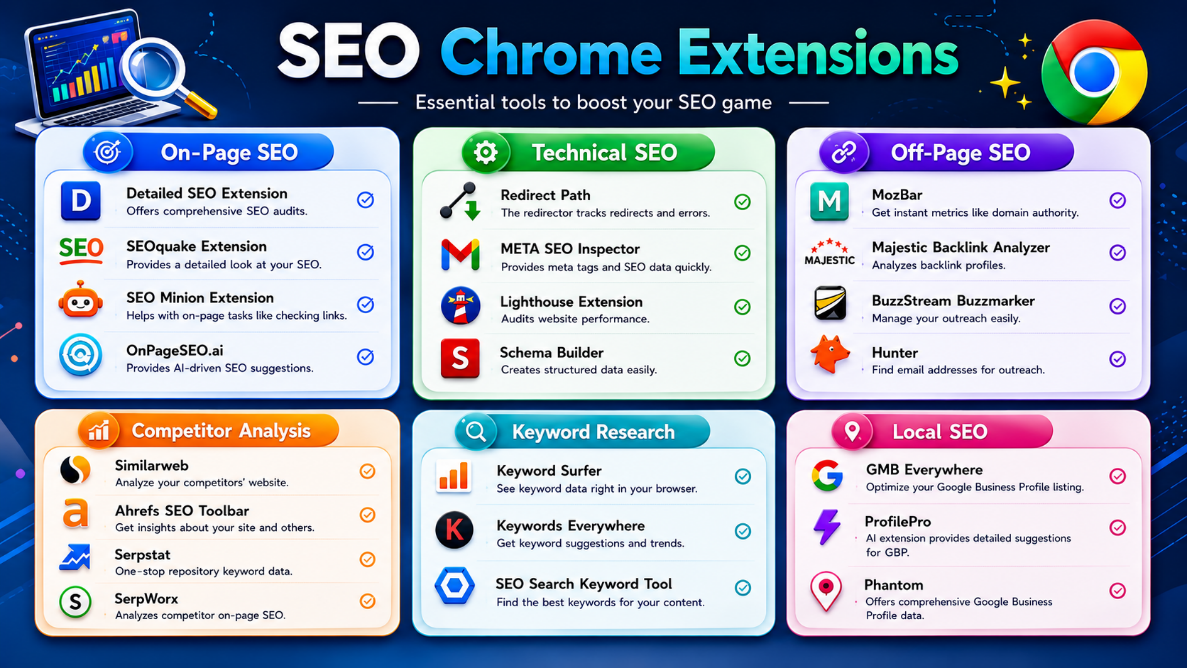
In today's digital landscape, search engine optimization (SEO) is more critical than ever for businesses and content creators looking to increase their online visibility. This comprehensive guide introduces you to 22 essential Chrome extensions specifically designed to enhance your SEO efforts.
These extensions cover every aspect of modern SEO, from on-page optimization to competitive analysis, keyword research to local search engine optimization. What makes these extensions particularly valuable is their accessibility - they integrate directly into your browser, providing real-time data without the need to switch between multiple platforms.
CATEGORY 1: ON-PAGE SEO EXTENSIONS
On-page SEO involves optimizing the content and HTML source code of individual web pages to rank higher in search engines.
1.1 Detailed SEO Extension
Purpose:
Offers comprehensive SEO audits directly from your browser. Identifies on-page SEO issues and opportunities instantly.
Key Features:
• Complete on-page SEO audits
• Meta tag analysis and recommendations
• Headings structure validation
• Image optimization insights
• Internal linking analysis
Best For: Digital marketers, content creators, and SEO specialists.
1.2 SEOquake Extension
Purpose:
Provides detailed SEO metrics and overall website performance analysis. A staple in the SEO professional's toolkit.
Key Features:
• Real-time SEO metrics display
• Competitor comparison tools
• Keyword density analysis
• Page diagnostics report
• Export reports in multiple formats
Best For: Professionals seeking quick SEO metrics and competitive benchmarking.
1.3 SEO Minion Extension
Purpose:
Lightweight extension for common on-page SEO tasks like checking links, validating pages, and identifying broken links.
Key Features:
• Link checking and validation
• Page structure analysis
• Broken link detection
• Lightweight and fast loading
Best For: Users needing lightweight tools for basic on-page SEO checks.
1.4 OnPageSEO.ai
Purpose:
Leverages artificial intelligence to provide intelligent, data-driven SEO suggestions.
Key Features:
• AI-powered SEO recommendations
• Content optimization suggestions
• Competitor content comparison
• Machine learning insights
Best For: Modern SEO professionals looking for AI-assisted optimization strategies.
CATEGORY 2: TECHNICAL SEO EXTENSIONS
Technical SEO focuses on optimizing the backend of your website to help search engines crawl and index your content more effectively.
2.1 Redirect Path
Purpose:
Tracks and visualizes all redirects as you browse, helping identify redirect chains and problems.
Key Features:
• Visual redirect chain display
• HTTP status code tracking
• Identifies redirect loops
• Response time measurement
Best For: Technical SEO professionals managing site migrations.
2.2 META SEO Inspector
Purpose:
Provides quick access to all meta tags and SEO data on any webpage.
Key Features:
• Meta tags visualization
• Open Graph data inspection
• Schema markup validation
• Quick export capabilities
Best For: Anyone who needs quick metadata audits.
2.3 Lighthouse Extension
Purpose:
Google's official tool for auditing website performance, accessibility, and best practices.
Key Features:
• Page speed analysis
• Mobile friendliness scoring
• Accessibility audit
• SEO recommendations
• Best practices verification
Best For: Website owners focused on performance optimization.
2.4 Schema Builder
Purpose:
Simplifies the creation of structured data markup for rich snippets.
Key Features:
• Easy schema markup generation
• Multiple schema type support
• Validation against Google standards
• Code snippet generation
Best For: Developers implementing structured data.
CATEGORY 3: OFF-PAGE SEO EXTENSIONS
Off-page SEO includes activities outside your website that impact rankings, primarily backlinks and mentions.
3.1 MozBar
Purpose:
One of the most popular SEO extensions, providing instant domain and page authority metrics.
Key Features:
• Domain Authority (DA) metrics
• Page Authority (PA) scores
• Backlink data analysis
• Spam score assessment
Best For: Evaluating link opportunities and competitive backlink profiles.
3.2 Majestic Backlink Analyzer
Purpose:
Offers deep backlink analysis to understand the quality and quantity of links.
Key Features:
• Comprehensive backlink profiles
• Citation Flow and Trust Flow metrics
• Historical backlink data
• Link anchor text analysis
Best For: Link analysts and SEO professionals.
3.3 BuzzStream Buzzmarker
Purpose:
Simplifies link-building outreach by saving and organizing prospects.
Key Features:
• One-click prospect saving
• Contact information extraction
• Integration with BuzzStream platform
• Campaign organization tools
Best For: Link builders managing outreach campaigns.
3.4 Hunter
Purpose:
Finds email addresses on websites for outreach and link-building campaigns.
Key Features:
• Email address discovery
• Domain search functionality
• Email verification
• Bulk search capabilities
Best For: Outreach professionals and link builders.
CATEGORY 4: COMPETITOR ANALYSIS EXTENSIONS
Understanding competitors' strategies is crucial for developing your own SEO approach.
4.1 Similarweb
Purpose:
Provides competitive intelligence showing traffic analytics and visitor insights.
Key Features:
• Monthly traffic estimation
• Traffic source breakdown
• Audience demographics
• Competitor comparison
Best For: Analyzing competitor traffic and market share.
4.2 Ahrefs SEO Toolbar
Purpose:
Provides quick SEO metrics for any site, making it easy to evaluate competitors.
Key Features:
• Domain Authority metrics
• Backlink overview
• Organic search data
• Content gap identification
Best For: SEO professionals using Ahrefs platform.
4.3 Serpstat
Purpose:
Comprehensive SEO platform providing keyword data and competitor analysis.
Key Features:
• Keyword difficulty metrics
• Search volume data
• Competitor keyword analysis
• Position tracking
Best For: SEO teams needing all-in-one competitive intelligence.
4.4 SerpWorx
Purpose:
Analyzes competitor on-page SEO with actionable recommendations.
Key Features:
• On-page SEO analysis
• Competitor comparison metrics
• Content recommendations
• Quick score calculation
Best For: Content creators benchmarking against competitors.
CATEGORY 5: KEYWORD RESEARCH EXTENSIONS
Keyword research is the foundation of SEO success. These extensions integrate keyword data into your browsing.
5.1 Keyword Surfer
Purpose:
Displays search volume and keyword metrics directly in Google Search results.
Key Features:
• Search volume display
• CPC and competition data
• Related keyword suggestions
• Free to use
Best For: Content creators doing keyword research in Google Search.
5.2 Keywords Everywhere
Purpose:
Extends keyword data across multiple platforms including Google, YouTube, and Amazon.
Key Features:
• Multi-platform integration
• Search volume metrics
• YouTube keyword data
• Trend analysis
Best For: Multi-channel marketers.
5.3 SEO Search Keyword Tool
Purpose:
Comprehensive keyword research tool for identifying best performing keywords.
Key Features:
• Keyword difficulty scoring
• Monthly search volume
• SERP analysis
• Content ideas generation
Best For: Content strategists identifying target keywords.
CATEGORY 6: LOCAL SEO EXTENSIONS
Local SEO is essential for businesses serving specific geographic areas.
6.1 GMB Everywhere
Purpose:
Helps optimize Google Business Profile listing with improvement recommendations.
Key Features:
• Profile optimization suggestions
• Competitor profile analysis
• Review monitoring
• Local search tracking
Best For: Local business owners and multi-location enterprises.
6.2 ProfilePro
Purpose:
Uses AI to provide detailed suggestions for Google Business Profile improvement.
Key Features:
• AI-powered recommendations
• Detailed improvement scoring
• Photo optimization guidance
• Category suggestions
Best For: Businesses wanting AI-assisted GBP optimization.
6.3 Phantom
Purpose:
Provides comprehensive Google Business Profile audits.
Key Features:
• Complete profile audits
• Competitor benchmarking
• Review analysis and insights
• Local ranking tracking
Best For: Local SEO specialists managing multiple client profiles.
WHY USE THESE EXTENSIONS?
Time Efficiency: Analyze pages directly in your browser without switching platforms. This saves hours for professionals analyzing multiple websites daily.
Real-Time Data Access: Get live metrics as you browse, enabling dynamic decision-making and research that would be impossible with static reports.
Actionable Insights: These extensions provide not just data but context and recommendations, helping you understand what to do about the metrics.
Cost-Effectiveness: Many are free or freemium, dramatically reducing costs compared to enterprise SEO platforms.
Competitive Advantage: Use the same tools as top SEO professionals to gain access to competitive intelligence.
Better Search Rankings: Data-driven decisions lead to better optimization and improved rankings.
BEST PRACTICES AND TIPS
1. Start with Essentials
Don't install all 22 extensions at once. Start with 3-4 that address your immediate needs: one on-page SEO tool, one technical SEO tool, and one keyword research extension.
2. Combine Tools for Verification
Cross-verify important metrics using multiple tools. Different tools use different methodologies, so triangulation provides confidence in decisions.
3. Focus on Your Goals
Choose extensions aligned with your specific objectives. If you're focused on local SEO, prioritize GMB and Phantom over keyword research tools.
4. Keep Learning and Evolving
SEO metrics and algorithms change constantly. Stay updated with each tool's latest features and understand algorithm changes.
5. Monitor Extension Permissions
Regularly review which extensions have access to your browsing data. Only keep installed extensions you actively use.
6. Integrate with Your Workflow
Develop a consistent process for using these tools. Analyze competitor sites with the same combination of tools in the same order.
7. Document Your Findings
Keep spreadsheets of competitor metrics, backlink profiles, and keyword opportunities. These records become invaluable for tracking progress.
CONCLUSION
The 22 SEO Chrome extensions covered in this guide represent a comprehensive toolkit for modern search engine optimization. Whether you're a freelance consultant, in-house marketing professional, or business owner, these tools can dramatically improve your SEO capabilities.
Remember that extensions are only as effective as the strategy they support. These tools should complement fundamental SEO best practices:
• Quality, relevant content creation
• Consistent on-page optimization
• Authoritative backlink building
• Technical site health maintenance
• User experience optimization
The journey to SEO success is not a sprint but a marathon. Start with tools that address your pressing needs, master them thoroughly, and gradually expand your toolkit as you grow.
With the right combination of these extensions and a commitment to SEO excellence, you'll be well-equipped to achieve your search ranking goals and drive meaningful organic traffic to your website.
Good luck with your SEO journey!